vSphere Announcements at VMware Explore 2023 Las Vegas

VMware has a lot of vSphere related announcements for their next big update, which is vSphere 8 Update 2. It is scheduled to be released Q3 2023 so that’s just around the corner. Core product announcements are usually my favorite because they touch the daily work for all VMware admins.

I know we all want to keep our vCenters running the latest version, but it can be tough to coordinate downtime with 7+ patches every year. It can easily take one hour for each upgrade in a medium sized environment. Keep in mind that the following doesn’t apply to vCenters in ELM and HA at the moment. Now there’s reduced downtime for upgrades of vCenter. It will only be down for about 5 minutes! This is accomplished due to the following. A new vCenter server is deployed with a temporary IP address, even for a minor patch. Data is copied from the old to new vCenter. Then the short downtime occurs when switching over and starting up services. On top of that, there’s an automatic LVM snapshot taken during patching, which can be resumed on a failure or rolled back. Being able to resume is nice because sometimes a upgrade fails for a very minor reason and need to start over. Now can fix it and resume the upgrade.

Renewing or replacing certificates has never been fun, but there’s been improvements over the past few years. Now there’s a new enhancement that everyone will appreciate. vCenter certs can now be renewed or replaced without restarting services so no downtime.

This next enhancement is useful if stuck in a bad situation with your vDS not being synced up with all hosts. This can happen when a backup is taken, a vDS change occurs, and then a restore. You will no longer have vDS inconsistencies when restoring from a backup. vDS changes will be pushed from cluster(s) to vCenter. This is also supported with a vDS using NSX.

At a previous job, I have had Microsoft engineers not thrilled with no vCenter identity provider federation support with Entra ID.  By the way, Microsoft recently changed Azure AD to now be called Entra ID. Now Entra ID is supported and all existing identity providers are still available. There’s another great addition on the Microsoft side. Adding an AD OU path is an option when going through the VM customization wizard. No more computer objects going to the computers container or automation needed outside of the wizard to do this.

I think we have all been in a situation where a backup or something has a lock on a VMDK. Then it’s a pain to track it down via CLI and logs. Now there is a detailed error message when a file is locked with the IP address and MAC of the host holding the file lock.

With AI and ML getting bigger and bigger, GPUs need to have better features at the hypervisor level. There have always been many caveats with a VM having a vGPU enabled. Now there has been further improvements with placement for vGPU enabled VMs. DRS now makes better deployment decisions with an initial placement of a VM. Also, vGPU enabled VMs are automatically migrated when needed to accommodate for larger VMs. There’s one other addition that I think is cool for vGPU enabled VMs. No more guessing how much time a user will be affected with a vMotion. You can now view a stun time estimate in edit settings of a VM.

Whenever there’s a big update, you can expect a new VM hardware version to be released. Now up to version 21.

Those are the features and improvements that I am looking forward to most in vSphere 8 Update 2, but wait, there’s more. There are many other advancements, such on the DevOps side. Give it a try on a VMware Hands-on Lab and check out VMware’s documentation for further details.
Storage Announcements at VMware Explore 2023 Las Vegas

There’s a lot to unpack with all of the storage related announcements at VMware Explore. You can easily tell why vSAN still has the lion’s share in the HCI space at 40% of the market. With announcements like vSAN ESA last year, it’s no surprise VMware is on top. Now there’s further advancements in the newly announced vSAN 8 Update 2 and the announcement of vSAN Max.

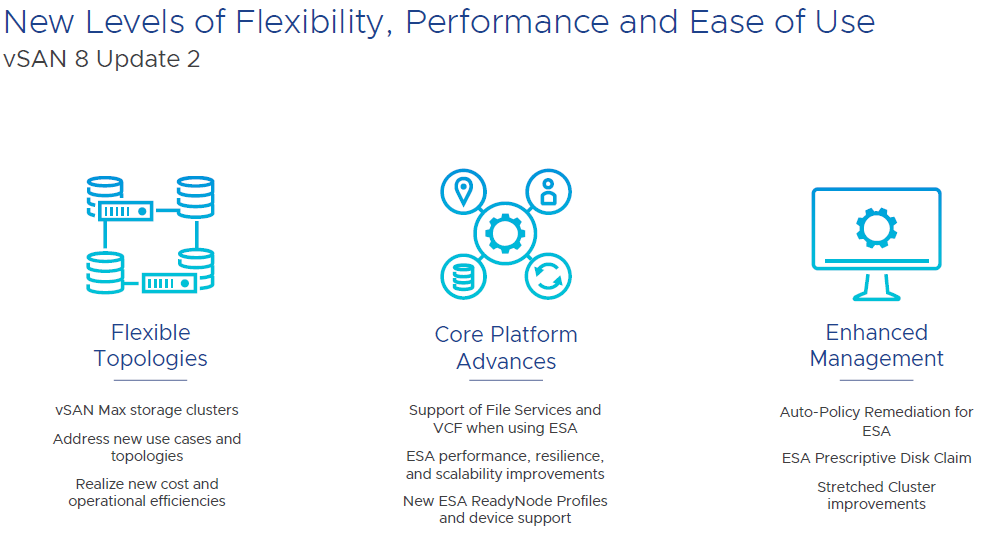
Let’s dig into the flexibility side. vSAN Max is disaggregated storage, which means that you can have a cluster with only compute hosts access vSAN storage from a dedicated storage cluster. This isn’t something hobbled together with iSCSI or NFS. This is an all native vSAN stack. For example, you can have a regular vSAN cluster purely on blades without drives and then the storage comes from a vSAN Max cluster. Could have this similarly before, but this is now optimized. Now up to 200% higher write throughput and up to 70% reduction in latency. vSAN Max makes it easier to add more storage by simply adding a new storage host. vSAN Max can be used in a stretched cluster on the storage and compute side.

Deploying a vSAN cluster will now give three options; vSAN HCI, vSAN Compute Cluster, and vSAN Max. Then you can select if a stretched cluster or not. On the compute cluster side, just a couple of selections needed and then can mount the remote datastore. You can check out the performance for vSAN Max and connected clusters on one dashboard. There is no support for in place upgrades from all existing vSAN editions and those existing licenses cannot be used for vSAN Max. It will use a new per-TiB licensing model.

Now let’s switch gears to core platform advances. There is now feature parity with with vSAN file services in ESA and OSA. That means file services, such as NFS and SMB, are available in ESA. Also, ESA is now supported in VCF 5.1 along with vSAN Max.

There have been a lot of performance improvements with ESA. Users should expect higher throughput and lower latency on write intensive workloads. DBAs will love this.

ESA can now support up to 500 VMs per host. That’s a big jump from the previous limit of 200 VMs. This is great news for VDI clusters.

ESA can now support much lower specs for a ReadyNode. This is as low as 16 cores, 128GB of memory, 10 GB network, and 3.2TB of storage per host. You will still get the benefit of the new snapshots, smaller failure domains, and improved efficiency to drive down costs. This should make ESA more appealing in small deployments.

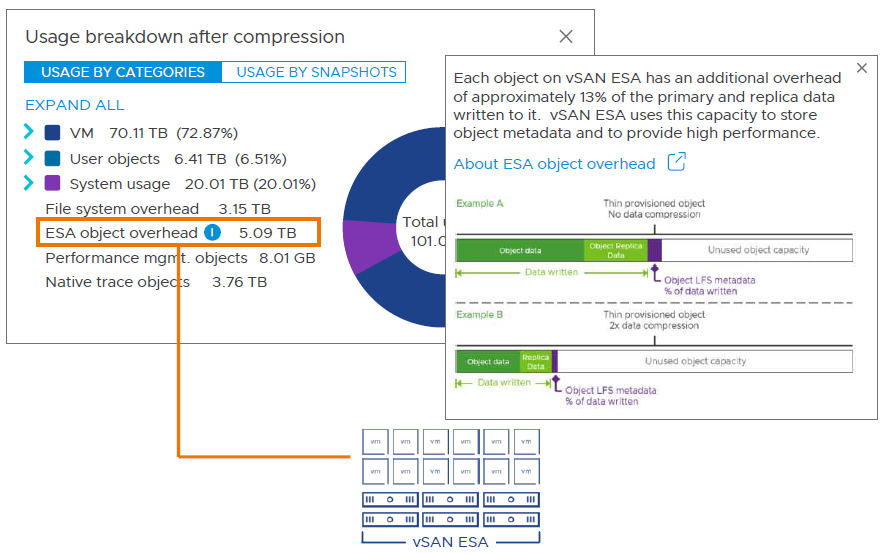
I will now wrap up with enhanced management. It’s now more straightforward to view capacity overheads in the UI. There’s now support for the key expiration standard with a KMIP based v1.2 KMS. The key expiration attribute is for OSA and ESA. It’s integrated with Skyline Health so you will find the warnings in that area. Now there are more options for recommendations on troubleshooting an issue. For example, there will be a default option and an alternative. If you have a finding, there is improved information on the risk of not remediating. It accounts for the specific version of vSAN that you are running. Also, you can now manage the lifecycle of all types of witness appliances in vLCM. These are improvements available in OSA and ESA.

There are also other improvements and features that I didn’t mention in this article so be sure to check out everything in VMware’s release notes. Put this all together and it’s a straightforward decision to go with ESA on new deployments with all of the new features and enhancements, but makes sense to keep using OSA if using legacy hardware. I am looking forward to implementing ESA.

Last Minute Tips for VMware Explore 2023 Las Vegas

VMware Explore 2023 Las Vegas is only a couple of days away and I am excited! I will be arriving on Sunday night and staying a couple extra days for fun. I have put a lot of time into preparing for this trip and have some tips to share.

Most of the parties are fully booked. Though, I did hear yesterday that the Elevate Technology User Group meeting still has room. Check out Russell Hamker’s Explore party list for the most extensive list that I have found.

There’s a lot of giveaways. VMware has a long list of their prizes. Rubrik and Oracle are both doing headshots. ControlUp will have a daily raffle at 11:45a. Rackspace will be giving a way a prize for people that go through a VR tour of one of their data centers. There’s many more giveaways from other companies, but these stuck out the most to me.

I received some inside details about food during the event. The food was lame in 2019, but much better in 2022. This year looks even better. For breakfast there will be a continental option, quinoa oatmeal, and sandwiches. Lunch will have a hot buffet that includes chicken cacciatore, beef tenderloin, salads, and desserts. I am glad to see a buffet option back at an event and makes sense being Vegas. There’s also a boxed lunch option with a sandwich. Gluten free, vegetarian, kosher, and halal meals are available if you selected them during your registration.

I will be posting a couple of articles on some of VMware’s latest announcements during the event next week so please check back. I will also dust off my Twitter account and will tweet throughout the event.